
How do you teach Braille numbers without turning the lesson into memorization alone? Pair each numeral with objects the student can count, then show how a familiar Braille letter pattern becomes a number when a numeric indicator comes first. This Braille numbers lesson gives teachers and families a flexible, hands-on sequence for introducing 0 through 10.
How Braille numbers work: the numeric indicator
In Unified English Braille (UEB), the digits 1 through 9 and 0 use the same dot patterns as the letters a through j, respectively. A numeric indicator—dots 3-4-5-6—tells the reader that the following patterns represent digits rather than letters. This is a rule of the Braille code, not a teaching shortcut. The Braille Authority of North America’s number examples show the relationship, and its ABCs of UEB explains how numeric mode works in longer expressions.
Start with the reading orientation of a standard six-dot cell: dots 1, 2, 3 run downward on the left; dots 4, 5, 6 run downward on the right. When working with a slate and stylus on the reverse of the paper, the writing process is mirrored; do not apply that reversed layout to ordinary Braille reading. American Printing House for the Blind (APH) explains the distinction.
Braille digit patterns: a reference for adults
The table below lists the digit cell after the numeric indicator. To make a complete single-digit Braille numeral, place the numeric indicator (dots 3-4-5-6) immediately before the listed letter-pattern cell. The letters are shown as memory aids, not as a substitute for embossed Braille.
| Digit | Letter pattern | Dots in digit cell |
|---|---|---|
| 1 | a | 1 |
| 2 | b | 1-2 |
| 3 | c | 1-4 |
| 4 | d | 1-4-5 |
| 5 | e | 1-5 |
| 6 | f | 1-2-4 |
| 7 | g | 1-2-4-5 |
| 8 | h | 1-2-5 |
| 9 | i | 2-4 |
| 0 | j | 2-4-5 |
For example, 3 is the numeric indicator followed by the pattern for c (dots 1-4). 0 uses the pattern for j (dots 2-4-5). For 10, use one numeric indicator followed by the patterns for a and j, with no space between the two digit cells. A single numeric indicator normally covers a run of digits; it is not repeated before every digit in that run. The exact handling of punctuation and letters in longer expressions follows UEB rules.
Materials for a 20-minute Braille numbers lesson
- Ten identical, safe-to-handle counters, blocks, or other familiar objects; avoid loose small objects with children who may put them in their mouths.
- Embossed Braille number cards from 0 through 10, or another accessible source of correctly spaced Braille numerals.
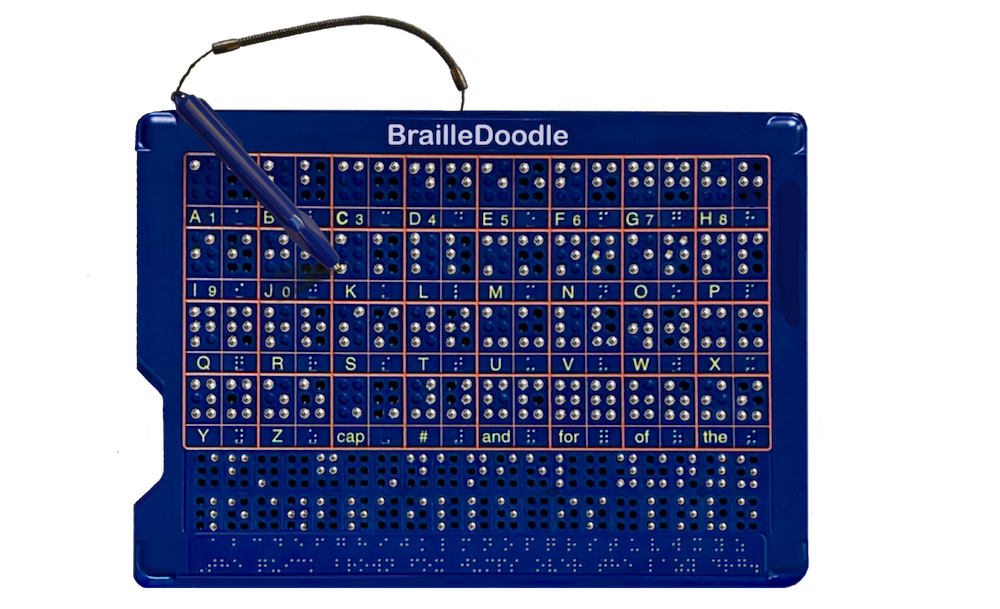
- A large six-dot demonstration cell made with tactile markers, or the BrailleDoodle Braille Side for practicing dot patterns.
- A tray or mat to organize the counters, plus optional high-contrast print labels for students who use residual vision.
Plan for about 20 minutes as a starting point, not a fixed standard. Some learners will need several short sessions to distinguish the numeric indicator from a letter pattern. A teacher of students with visual impairments (TVI) can tailor the sequence to the learner’s reading readiness and preferred tactile materials.
Five steps: teach the number sign and count by touch
1. Start with real quantities (3 minutes)
Offer one counter, then two, then three. Let the learner touch and count each set, and match it to a spoken number or accessible number word. Include an empty tray for zero so that zero has a concrete meaning rather than being introduced as a mysterious extra symbol.
2. Explore the six-dot cell (3 minutes)
Have the student find the upper-left dot (1), lower-left dot (3), upper-right dot (4), and lower-right dot (6). Use a stable orientation and let the student examine the cell without rushing. Next, introduce the numeric indicator as the separate Braille cell made of dots 3-4-5-6. Say its role clearly: “This tells us the next pattern is a number.”
3. Build and read 1, 2, and 3 (5 minutes)
Begin with three number cards. For each one, have the learner locate the numeric indicator, identify the digit pattern, and then place the matching number of counters beside the card. The digit patterns are 1 (dot 1), 2 (dots 1-2), and 3 (dots 1-4). Keep the indicator and digit in separate, correctly oriented cells. Repeat in a mixed order rather than only counting upward.
4. Add 0 and 4–10 gradually (6 minutes)
Introduce new numerals in small groups according to the student’s progress. To demonstrate 10, set out ten counters in two groups of five, then show the numeric indicator followed by the digit patterns for 1 and 0. Ask the student to identify the two digits in the numeral and connect the numeral to the ten objects. Do not assume that recognizing a digit pattern means the student understands the quantity it represents.
5. Play “Read, Count, Check” (3 minutes)
Put three number cards on the table, such as 2, 5, and 0. Ask the learner to choose one, read it, collect that many counters, and check the result. Change the order and let the student become the “teacher” who selects a number for you. The goal is independent interpretation, not speed.
Three common stumbling blocks—and what to do
Confusing a letter with a digit
Because the digit cells reuse a–j patterns, a learner may correctly identify the pattern for “b” but miss the preceding numeric indicator. Have the student trace the whole two-cell numeral from left to right. Contrast the letter b with the number 2 on two correctly embossed cards, and ask what changes.
Reading an enlarged model as standard Braille
Large tactile cells are useful for understanding dot positions, but their spacing differs from ordinary Braille. Follow large-cell demonstrations with correctly sized embossed Braille so learners can practice the reading format they will actually encounter. APH uses this kind of large-cell approach in its Pop-A-Cell description; it should supplement, not replace, literacy instruction with standard Braille.
Memorizing symbols without number sense
Ask the learner to read the numeral, make the quantity, and explain the match. This makes it possible to see whether the challenge is tactile symbol recognition, counting, or connecting the two. For another classroom variation, Paths to Literacy describes a number-card-and-counter activity that links Braille numerals to sets of objects.
Using BrailleDoodle to practice Braille numbers
On BrailleDoodle, the Braille Side is intended for letter and cell practice; its learning layout includes example and practice cells and a number indicator reference. A magnetic stylus raises tactile dots, which can be pressed down to revise a pattern. Start by locating the numeric indicator and forming one digit at a time, then progress to short sequences on the writing rows as appropriate. For device orientation and guided activities, see our Directions and Lessons page.
The separate Doodle Side has a 41 × 31 grid for reusable tactile drawing. It can be used to make a simple counting picture or arrange groups of raised dots, but an open drawing grid is not a substitute for correctly spaced standard Braille numeral cells. BrailleDoodle does not require batteries or internet access; its current listed retail price is $179 USD.
For a wider introduction to beginning Braille activities, see How to Teach Beginning Braille: Five Hands-On Activities. For a related math extension after the student understands numerals, try our tactile bar graph lesson.
How to check progress without a timed test
At the end of the session, offer three familiar numerals in an unfamiliar order. Note whether the learner can (1) find the numeric indicator, (2) identify the digit, (3) make the matching quantity, and (4) correct a mismatch with a prompt or independently. Record the specific support needed and revisit those skills next time. The sequence above is a practical lesson suggestion, not a claim that a particular method has been proven superior in a controlled study.
Sources and further reading
- Braille Authority of North America — Braille numbers and the numeric indicator (code reference).
- Braille Authority of North America — ABCs of Unified English Braille (numeric-mode rules).
- American Printing House for the Blind — Slate-and-stylus Braille basics (reading versus reverse-side writing orientation).
- Paths to Literacy — Literary Numbers Activity (classroom example linking numerals and counters).