
Getting to know your new BrailleDoodle.
Enjoy all short instructional videos and transcripts below!

Please note: The instructional videos contain a lot of information. You can pause, restart, or come back to them anytime. In all the videos, images match the audio descriptions. If you have any technical issues, please contact us immediately. Use the Contact Us button below or email Matthew@TouchPadProFoundation.org.

A QuickStart Guide
and
Using the Doodle Side


Welcome to the BrailleDoodle. We’re excited to welcome you to the BrailleDoodle family. Let’s get familiar with your device.

Inside the box, you’ll find the BrailleDoodle, two sheets of directions, and three ‘Doodle Touch Covers.’ These covers have cutouts that fit over the Doodle Side of the device, like stencils.

The BrailleDoodle has two sides: a “Braille Learning Side” and a “Doodle Side.”

Let’s begin with the Doodle Side. This side has an array of 1,333 tiny holes. Orienting the Doodle Side in front of you starts by finding the raised printed letters at the top and the inset rectangle for a sticker at the bottom. The stylus will be in a slot on your right-hand side.

The stylus has a rounded magnet on one end and is shaped like a thick pen. The bottom has a triangular grip to help those not accustomed to holding a pen. Just pinch the triangle grip, position the top of the stylus into the space between the pointer finger and thumb, and you are holding it correctly.

The spring lanyard may sometimes feel too short or tight. If this is the case, stretch the spring as far as it will go. Don’t worry—it will not break. Then try again; it will feel looser. This may need to be repeated several times.

Using the stylus, slide it gently across the surface to raise dots or tap individual holes to raise them one by one. Be gentle with your touch to extend the life of your BrailleDoodle.

To erase dots, you can push them down with your finger. To clear the surface quickly, hold the triangular bottom of the stylus sideways and swipe the board vigorously.

Please note: Your BrailleDoodle will work better as you make it yours and use it more and more. Give the BrailleDoodle a week or so to reach its peak performance.

Another feature on the Doodle Side is raised dot markers like a dotted line across the center horizontally and vertically. These raised dotted lines allow for orientation to the center of the Doodle Side and can also be used to set up an x and y axis for advanced graphing. A future video will cover advanced x and y graphing.

We will now tour the Braille Learning Side of the BrailleDoodle. So flip over the BrailleDoodle and get ready.

The Braille Learning Side

Understanding the Braille Learning Side

First, let’s orient the BrailleDoodle on the Braille Learning Side by finding the raised printed letters of the word “BrailleDoodle” at the top and two lines of standard Braille across the bottom. The magnetic stylus should now be in its storage holder on your left-hand side (at 9 o’clock).

The front of the BrailleDoodle has holes arranged in groups of six, two dots by three dots. These groupings create two sizes of large Braille cells. Braille letters are formed using the magnetic stylus to create a tactile dot. The dot is erased using a finger to push it back down.

In the upper-left-hand corner are four rows of 16 Braille cells, each surrounded by tactile ridges. From left to right, the Braille Cells are divided into pairs to form each character. The first Braille cell of the pair is called the ‘Example Cell.’ Here, only the holes specific to that Braille character are functional. The ‘Example Cell.’ allows learners to repeatedly create that particular character as an example while still being able to feel all six holes.

Second in the pair is the ‘Practice Cell.’ In the ‘Practice Cell,’ learners can refine their skills using the six operative holes to practice that character.

Under each ‘Example Cell,’ letters and words are rendered in raised yellow print, allowing sighted users to follow along. Beneath each ‘Practice Cell,’ the Braille character is displayed in standard size on a raised rectangle.  

Along with the Braille alphabet, there is also the capital indicator, the number indicator, the words ‘and,’ ‘for,’ ‘of,’ and the word ‘the.’

We go into further detail in the Braille Lesson video and transcripts.

Beneath the Braille alphabet and sight words, you’ll find two rows of 19 Braille cells separated by fine ridges. These rows of cells allow learners to read and write in complete words and sentences. 

A recessed rectangle located at the bottom has two lines of standard-sized Braille. The top line is the standard-size Braille English alphabet with appropriate spacing. The line below has a famous sentence using every letter: “The quick brown fox jumps over the lazy dog.” This helps users experience standard Braille in letters, words, and sentences.

Again, if you are experiencing any technical issues, please contact us so we can assist. Click the Contact Us button below or email Matthew@TouchPadProFoundation.org

The next video introduces the stencil-like DoodleTouch Covers for the Doodle Side. So, flip over the BrailleDoodle, grab the DoodleTouch Covers, and get ready!

The DoodleTouch Covers

The DoodleTouch Covers for the Doodle Side


Let’s try The House Cover. Hold the Cover over the Doodle Side of the BrailleDoodle with the large letter H and jumbo Braille cells at the top left and the large tree shape on the right. Starting at the top of the Doodle Side, slide the Cover under the four notches until it stops at the bottom.


Now, only the dots that are not covered can be raised. Begin to fill in the dots, creating the capital H, the letters to spell “house” in Braille, and the tactile images. It is best to fill in the entire shape with gentle strokes of the stylus. Another video will include a more detailed lesson on art and perspective with The House Cover.


You can then remove the Cover and feel your creation.


Next, you can try the MathDoodle Cover. Hold the MathDoodle Cover so the cutout dots are across the bottom and from bottom to top to the left. Slide the Cover down onto the device, dividing the dots into 2-by-2 square cells. Another video will explain more uses of the MathDoodle Cover, including how to make and manipulate bar graphs and solve long-form math equations like the Brannan Cubarithm Slate, invented over 130 years ago.


Next, we can try the Braille Cover that divides the Doodle Side into dozens of large Braille cells. IMPORTANT – the Braille Cover has a thick (one-inch) margin on the bottom. Slide the Cover onto the Braille Doodle with the thick margin in the down position. After sliding it on, you can start writing words and sentences in 84 Braille Cells.


More videos on using the Doodle Side and DoodleTouch Covers will be coming soon. Help us think of more uses and DoodleTouch Covers, or if you have any questions, click the Contact Us button or email Matthew@TouchPadProFoundation.org.


The First Braille Lessons

Introduction

Important note about teaching yourself Braille. The following lessons are written so anyone, a teacher, a parent, a sibling, a friend, etc., can help guide you. But if you are learning yourself, it’s not a problem! You can play both parts. Go very slowly. Stop and start a lot, and you will be directing yourself through the lessons in no time! Please note that these instructions are to be used as a general guide. Once understood, lessons can be modified to match a teacher’s instructional style or a student’s learning style. Modifications will also need to be made for the student’s age. 

BrailleDoodle was designed to make learning intuitive, relaxed, and fun! The time students take to master each of the following steps will vary greatly. Efforts should be made to note each student’s pace of learning and adjust instruction accordingly. For example, some students may only learn 1 to 3 letters at a time. 

Be sure to pile on lots of praise!

PART ONE 

Step one

Introducing the Dots

Learn to raise and ‘erase’ the dots Place the BrailleDoodle with the Braille Side in front of the learner and put the stylus in their dominant hand. The bottom has a triangular grip to help those not accustomed to holding a pen. Still, you may have to guide the learner to pinch the grip and let the top of the stylus drop between the pointer finger and thumb. 

Explain how the stylus raises the dots while the other hand feels them as they work. Move around the surface, practicing raising and pushing various dots back down. Tell the learner that the stylus requires no pressure to make the dots, and touching creations should always be done gently and simultaneously with their free hand. 

NOTE: Have the learner get in the habit of occasionally putting aside the stylus and feeling their work on the BrailleDoodle using both hands. Explain how reading is always done with both hands.

Put the stylus aside, and starting in the upper left-hand corner, using hand over hand, have the learner feel the first braille cell and have them be able to count the dots in the assigned order. 
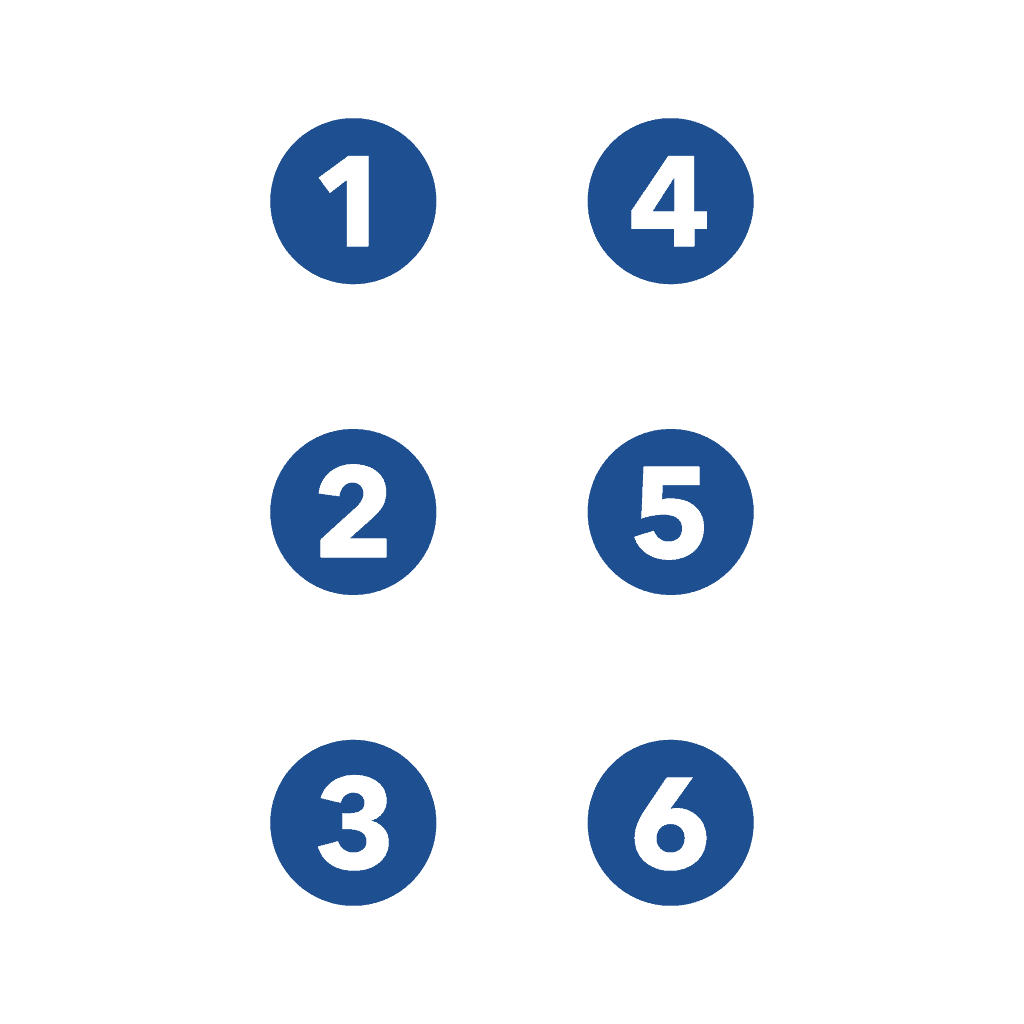
The braille cell made up of two columns of 3 dots each, making a total of six dots

Explain – 

“The Braille cell made up of two columns of 3 dots each, making a total of six dots. Each dot has a number 1 through 6. Beginning in the top left corner of the cell is dot 1. Moving down are dots 2 and 3. In the top right corner is dot 4. Then, moving down the right column are dots 5 and 6.”

Step three

Practice the dot numbers. Have the learner move to the second cell, the ‘Practice Cell,’ where all the dots function, and have them lift the numbered dots you instruct them to: 

  • “Lift, dot one. Good, push it back down.” 
  • “Lift dot 5. Good, push it back down.” 
  • “Lift dots one and three. Good, push them back down.” and so on. 

Practice all dots and some combos, then move to the bottom rows of 19 smaller braille cells and practice by continuing the exercise across the bottom. 

NOTE: The learner may benefit from having the instructor isolate the cells where the learner works by using their hands or some form of guide. The guide can be made by cutting a rectangular hole in an index card or thick paper. Fold the paper in half and toward the center, making two small cuts down and one across. Then, when you unfold the paper, you will have your guide.

PART TWO
Learning Braille Letters

Guide the learner back to the top cell in the upper-left-hand corner and explain that the first letter they will make is “A.”

  1. Have the learner identify the dots and then “discover” with the stylus that dot 1 is the only one that functions. (Always use the two-hand method, one hand creating with the stylus and the other feeling as they go.) 
  2. Have them examine this cell closely while they say the letter ‘ay’ aloud. (This is a multisensory learning technique that increases retention.) 

  3. Have the learner form an ‘a’ in the practice cell and have them make sure it matches. Mistakes can be fixed right away by pressing down on the dots. Again, they should say ‘ay’ aloud and repeat these steps several times. 

  4. Have the learner put the stylus aside and use both their hands. The letter ‘a’ in standard-sized Braille is below the practice cell. Have the learner discover how the jumbo braille Cells above and this standard-size Braille feel similar. 

  5. The learner can move down to the rows of braille cells below the alphabet and be instructed to make 19’  a’s across. 

  6. Put the stylus aside and have the learner feel their creation. Be sure to emphasize proper finger placement and tracking. A video that explains how to teach this well is available. Click on the text below, HERE, or Google “YouTube Braille Tracking Techniques.” 

  7. Guide the learner’s hand down to the rows of standard-size braille letters at the bottom of the device. Help the learner find the letter “A” in the row with the alphabet and then in the row below that has the sentence, “The quick brown fox jumps over the lazy dog.” 

NOTE: For younger children, one should emphasize the phonics of each letter heavily. Sounds and words that start with that sound should be repeated: ‘A’ for ape. ‘A’ for apple, etc. 

PART THREE 

More Advanced Braille Patterns and Practice

Completing the Braille Alphabet Then, introduce the braille patterns to complete the alphabet. 

NOTE – Most braille instructors introduce the following braille patterns in this order: Explanation of the chart below. 

ROW 1 – A through J uses only the top four dots (Positions 1, 2, 4, and 5). The same patterns also represent numbers 1 through 0, but a number sign is used before them to indicate they are numbers.

ROW 2 – K through T are similar to A through J but with an extra dot in position 3. 

ROW 3 – This line includes the letters U through Z. These letters are similar to K through O but with an additional dot in position 6. 

NOTE: There was no “W” in the French alphabet when Louis Braille invented it. Therefore, it was added later. 


Optional Activity: Fun Braille Mnemonics

Remembering Braille Patterns Through Imagination and Play

Mnemonics are fun memory tricks that make Braille patterns easier to learn and remember. Encourage learners to imagine each phrase, say it aloud, and feel the corresponding Braille dots. The sillier and more memorable the image, the better!

Step 1: Master A–J

Begin by helping learners recognize and remember the Braille letters A through J. These first ten letters are the foundation for many of the patterns that follow.

Step 2: Discover the Pattern for K–T

Introduce the phrase “3 Kittens Arrive!”

Ask: “What could three kittens arriving look like? Can you picture them? Now say ‘3 Kittens Arrive’ ten times fast!”

Explain that K is just like A, with dot 3 added. Have the learner feel both letters and discover the difference.

Next, introduce “3 Likable Bees!”

Explain that L is B with dot 3 added. Ask, “Can three bees really be likable? Buzzz!”

Continue exploring the pattern, one letter at a time. Make sure learners are comfortable with each group before moving ahead.

Memory Tricks for K–T

  • K: 3 Kittens Arrive (3 + A)

  • L: 3 Likable Bees (3 + B)

  • M: 3 Mice Cry (3 + C)

  • N: 3 Napping Doves (3 + D)

  • O: 3 Oranges Eaten (3 + E)

  • P: 3 Playful Foxes (3 + F)

  • Q: 3 Quiet Giraffes (3 + G)

  • R: 3 Rabbits Hop (3 + H)

  • S: 3 Silly Insects (3 + I)

  • T: 3 Ticks Jump (3 + J)

Step 3: Discover U–Z

Now comes another fun pattern! Most of the remaining letters follow the same A–J patterns, but with dots 3 and 6 added.

Introduce “36 Unicorns Arrive!” Imagine 36 unicorns galloping into the classroom!

Explain that U is A with dots 3 and 6 added. Let the learner compare the two patterns by touch.

Memory Tricks for U–Z

  • U: 36 Unicorns Arrive (3 + 6 + A)

  • V: 36 Violins Break (3 + 6 + B)

  • W: 6 Wacky Jacks (6 + J)

  • X: 36 X-rays of Cats (3 + 6 + C)

  • Y: 36 Yellow Diamonds (3 + 6 + D)

  • Z: 36 Zebras Eat (3 + 6 + E)

Remember: W is the special exception! It is formed by adding dot 6 to J, without adding dot 3.

Step 4: Explore, Create, and Remember!

Encourage learners to invent their own silly phrases and stories. Have them say the phrases aloud, form the Braille letters on the BrailleDoodle, and identify the dot patterns through touch.

Once learners are comfortable with the alphabet, introduce the Braille capital sign and number sign. Challenge them to create capital letters, numbers, and simple words using their new skills.

The goal is simple: Make Braille learning playful, memorable, and rewarding—one dot at a time!

BrailleDoodle Learning Guide

Parts Four–Eight: From Braille Letters to Words and Sentences


PART FOUR – Understanding the Capital Indicator

Learning Goal: Learn how to form capital letters in Braille using dot 6.

Step 1: Discover the Capital Indicator

  • Find the capital indicator (dot 6) on the BrailleDoodle, located just after the letter Z.

  • Explain that placing dot 6 in a separate cell before a letter makes that letter capitalized.

  • For example, capital A is formed using dot 6 in the first cell, followed by dot 1 (A) in the next cell.

Have learners feel both cells to understand how the capital indicator works.

Step 2: Practice and Explore

  • Have learners create 38 capital indicators using the two rows of blank Braille cells at the bottom of the BrailleDoodle.

  • Encourage them to feel each dot 6 and check their work.

  • Starting with capital A, practice forming capital letters throughout the alphabet.

  • Challenge learners to write their names using capital letters.

Step 3: Make It Fun!

Ask: “What’s the difference between a little a and a BIG A?”

Let learners discover that the capital indicator changes how we read the letter without changing the letter’s own dot pattern.

Remember: A single capital indicator capitalizes the letter immediately following it. Capitalizing an entire word uses a different rule that can be introduced later.


PART FIVE – Forming Braille Numbers

Learning Goal: Discover how the first ten Braille letters become numbers using the number indicator.

Step 1: Discover the Number Pattern

Explain that Braille uses the same dot patterns for letters A–J to represent the numbers 1–9 and 0.

LetterNumber
A1
B2
C3
D4
E5
F6
G7
H8
I9
J0

Step 2: Meet the Number Indicator

  • Find the number indicator (dots 3, 4, 5, and 6) on the BrailleDoodle.

  • Explain that placing the number indicator before A–J tells us to read the following letters as numbers.

  • For example, to write 1, make dots 3, 4, 5, and 6 in one cell, followed by dot 1 (A) in the next cell.

Step 3: Practice and Explore

  • Have learners create 38 number indicators across the two rows of blank Braille cells.

  • Practice forming the numbers 1 through 9 and 0.

  • Next, try two-digit numbers like 12, 25, or 50. Explain that one number indicator is generally enough for a whole number, as long as the number sequence isn’t interrupted.

  • Encourage learners to explore meaningful numbers, such as their age, birthday, or favorite number.

Step 4: Make It Fun!

Ask: “Can you believe that A can also be 1? It’s like Braille has a secret code!”

Video Activity: Watch the Reading and Writing Numbers video and practice together on the BrailleDoodle.

Remember: A single number indicator can introduce an entire sequence of digits. You don’t need to repeat it before every digit.


PART SIX – Learning Common Braille Contractions

Learning Goal: Discover how certain words can be represented by a single Braille cell.

Step 1: Discover Braille Shortcuts

Explain that Braille has special patterns called contractions that make reading and writing faster and take up less space.

Introduce the four whole-word contractions already shown on the BrailleDoodle:

  • AND – dots 1, 2, 3, 4, 6

  • FOR – dots 1, 2, 3, 4, 5, 6

  • OF – dots 1, 2, 3, 5, 6

  • THE – dots 2, 3, 4, 6

Next, introduce:

  • WITH – dots 2, 3, 4, 5, 6

Step 2: Feel, Write, and Remember

  • Have learners find and feel each contraction.

  • Practice making the dot patterns on the BrailleDoodle.

  • Explain how an entire word can fit into just one Braille cell!

  • Challenge learners to recognize each contraction through touch without being told which one it is.

Step 3: Build Simple Phrases

Practice making phrases such as:

  • “For the cat”

  • “The cat and the dog”

  • “A cat with a hat”

Learners can spell the words letter by letter or use the contractions they have learned.

Step 4: Make It Fun!

Ask: “Wouldn’t it be amazing if you could write a whole word using just one Braille cell? Well, you can!”

Teaching Tip: These contractions are part of contracted (Grade 2) Braille. Learners can also write these words letter by letter in uncontracted (Grade 1) Braille. Introduce contractions according to each learner’s readiness and instructional goals.


PART SEVEN – Understanding Spaces and Punctuation

Learning Goal: Discover how spaces and punctuation help turn Braille letters into words, sentences, and stories.

Step 1: Learning to Leave Spaces

Explain that, just like printed words, Braille words need spaces between them so readers can tell where one word ends and another begins.

  • Form a simple word like CAT on the BrailleDoodle.

  • Leave one Braille cell empty.

  • Form another word, like SAT.

  • Have learners feel the words and the empty cell between them.

Make It Fun! Ask: “What happens if all our words run together? How would we know where one word ends and another begins?”

Step 2: Meet Braille Punctuation

Explain that punctuation gives our sentences meaning. Just as we use punctuation in print, we use special dot patterns in Braille.

Introduce three common punctuation marks:

  • Period (.) – dots 2, 5, 6

  • Comma (,) – dot 2

  • Question mark (?) – dots 2, 3, 6

Have learners practice making each symbol and recognizing it by touch.

Step 3: Create Simple Sentences

Start with short sentences:

  • “I am Sam.”

  • “The cat sat.”

  • “Can I go?”

  • “Yes, I can.”

Encourage learners to include spaces, capital letters, and punctuation.

Help them discover that every part of a sentence has a purpose!

Step 4: Play the Punctuation Game!

Say a short sentence aloud and ask learners to decide which punctuation mark belongs at the end.

For example:

  • “The dog is big.” – Period!

  • “Where is my cat?” – Question mark!

  • “Yes, I see it.” – Comma and period!

Let learners create their own silly sentences and challenge you to punctuate them.

Teaching Tip: These punctuation marks follow Unified English Braille (UEB). Keep activities short and provide plenty of opportunities to feel, erase, correct, and try again.


PART EIGHT – Building Words and Sentences

Learning Goal: Bring everything together by using Braille letters, spaces, capitals, and punctuation to create words, sentences, and stories!

Now that learners have explored letters, capital indicators, numbers, spaces, and punctuation, it’s time to put their new skills into action.

Step 1: Start with Three-Letter Words

Begin with simple, familiar, rhyming words:

  • CAT

  • SAT

  • FAT

  • MAT

  • RAT

Encourage learners to form each word on the BrailleDoodle, then read it back by touch.

Ask: “What happens if we change just the first letter of CAT? Can we make HAT? BAT? RAT?”

This helps learners discover how changing just one letter can create a whole new word.

Step 2: Build Simple Sentences

Start small and gradually add more words:

  • “The cat sat.”

  • “The fat cat sat.”

  • “The fat cat sat on a mat.”

Have learners read each sentence aloud while exploring the Braille dots with their fingers.

Encourage them to make their own funny sentences. The sillier, the better!

Step 3: Explore Longer Words and Sentences

As confidence grows, introduce longer words, punctuation, and more complex sentences.

Try activities such as:

  • Writing names of family members, friends, or pets.

  • Creating silly sentences and short stories.

  • Practicing capital letters at the beginning of sentences.

  • Adding numbers to describe ages, quantities, or dates.

  • Using familiar contractions when appropriate.

Step 4: Celebrate Progress!

Encourage learners to create their own words and sentences without copying a model.

Let them experiment, make mistakes, erase, and try again.

Remember: There is no failure on the BrailleDoodle—just another opportunity to learn, create, and explore!


A Final Note for Educators and Families

Every learner progresses at their own pace. Some may quickly recognize patterns, while others benefit from repeated tactile exploration and playful practice.

Keep lessons short, engaging, and encouraging. Celebrate small victories and give learners the freedom to discover Braille through their own hands.

The BrailleDoodle’s reusable surface makes it easy to experiment, correct mistakes, and begin again—without wasting paper or worrying about getting everything right the first time.

The goal isn’t just to memorize Braille. It’s to build confidence, independence, literacy, and a lifelong love of learning through touch.

Learn. Create. Explore Through Touch.

The TouchPad Pro Foundation | BrailleDoodle.org


 Detailed description or “Alt text” to explain the BrailleDoodle: 

The BrailleDoodle is a two-sided tablet designed for braille learning and creating tactile images. The dimensions resemble that of a standard laptop, and it is constructed with durable dark blue plastic.

MEASUREMENTS

– Length: 12.8 inches (325 mm)

– Width: 9.25 inches (235 mm)

– Thickness: 1.1 inches (27 mm)

Alt text is below

On its front side, the ‘Braille Side,’ the word “BrailleDoodle” is centered in yellow, and the TPPF logo is positioned to the right. This side is adorned with an array of holes arranged in two sizes of Braille cells. Each hole contains a tiny metal ball that can be raised to the surface using a magnetic stylus and securely locked in place, creating a tactile effect. The magnetic stylus is stored in a slot on the side, tethered to the BrailleDoodle via a spring cord.

Prominently featured are four rows of eight rectangles, each demarcated by substantial tactile ridges, housing examples, and practice spaces for each individual letter. In the ‘Example Braille Cell,’ only the holes relevant to that specific letter are functional, allowing learners to repeatedly create that particular letter as an example. Adjacent to it, within the ‘Practice Braille Cell,’ learners can refine their skills by using the six operative holes situated beside it to practice that letter. Complementing the Braille Alphabet, there is also the capital indicator, the number indicator, and the words ‘and,’ ‘for,’ ‘of,’ and ‘the’ presented in Braille.

Directly beneath each ‘Example Braille Cell,’ letters and words are rendered in yellow print. Underneath each ‘Practice Braille Cell,’ the Braille letter is displayed in standard size on a raised rectangle. The four sections are divided by slender tactile lines. The Braille cells in the upper section feature larger holes and metal balls for enhanced legibility.

Beneath the Braille alphabet, you’ll find two rows of 19 Braille cells separated by fine ridges. These smaller holes and metal balls are configured in 6-dot clusters, facilitating the composition of complete words and sentences. In this picture, in Braille, a sentence reads, “The BrailleDoodle is awesome!!! Yes!”

Located beneath these two lines of Braille cells is a recessed rectangle extending the length of the BrailleDoodle. The top row presents each standard-size Braille letter with appropriate spacing, while the row below showcases the famous sentence encompassing every letter: “The quick brown fox jumps over the lazy dog.” This arrangement enables users to acquaint themselves with standard Braille in both word and sentence formats.

Alt text belowTurning to the “Doodle Side,” an array of 41 by 31 holes awaits exploration, totaling 1333 dots in all. Each ball, when raised, maintains a consistent distance of 6 mm from center to center. As depicted in our primary image, the surface is adorned with raised silver dots, creating tactile representations of a house, a capital letter ‘H,’ and the word ‘house’ in Braille.

In the near future, the BrailleDoodle will introduce a range of specialized cover options that serve as stencils. The BrailleDoodle features four notches, two on each side of the doodle surface, securely holding these flat covers in position. These flat covers will encompass guidance in various aspects, including Braille music, Braille math, contractions, shapes, graphs, art, and Braille in multiple languages.

The stylus is 4.6 inches (117mm) long and has a rounded magnet on one end and a hole for the tether on the other. It is shaped like a thick pen and is .5 in (13mm) wide at its widest point. The bottom has a triangular grip to help those not accustomed to holding a pen. Just pinch the grip, and you are holding it correctly.